

You typed “sfm compile” into Google and hit a wall of strange file names. Crowbar. QC. MDL. StudioMDL. It feels like a secret language. The idea behind SFM compilation is simple. Once you see the pattern, it stops being scary.
This guide explains what “SFM compile” means in plain words. You will learn the tools you need and the exact steps to follow. You will also see the errors that trip up most beginners and the quick fixes for each one. By the end you can move a model from Blender into Source Filmmaker with confidence.
What Is SFM Compile?
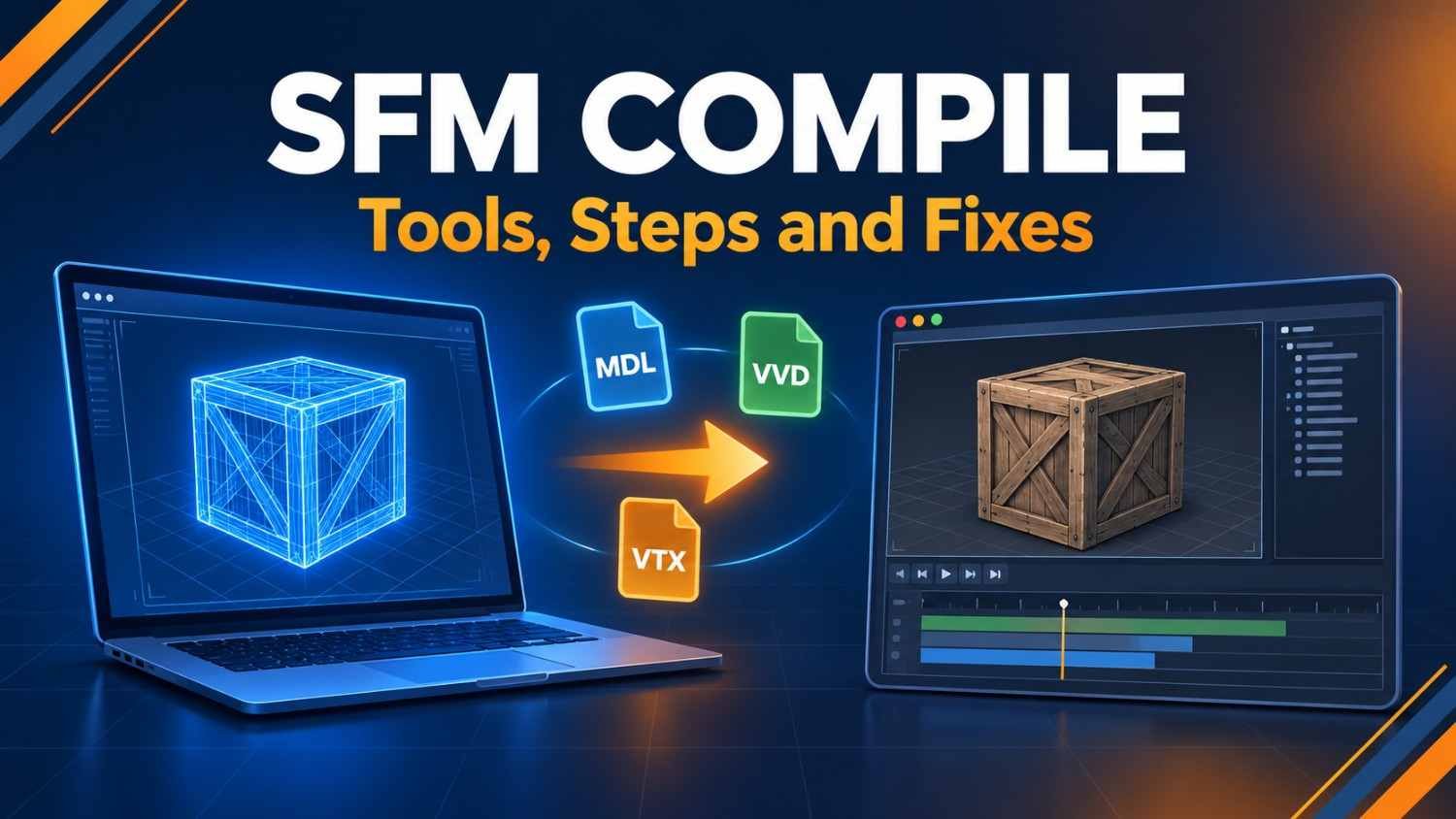
SFM compile is the process of turning raw 3D files into Source Engine files that Source Filmmaker can load. For a model, this means exporting SMD or DMX meshes, writing a QC script, and running it through Crowbar or StudioMDL. The result is a set of MDL, VVD, and VTX files.
What Does “SFM Compile” Mean?
SFM here is not texting slang. It stands for Source Filmmaker, a free animation tool from Valve. In computer vision the same letters can mean structure from motion, but that is a different field. When someone says “SFM compile,” they almost always mean building assets for Source Filmmaker.
To compile means to convert friendly files into a form a program can run fast. You can read a text script or open a mesh in Blender. A game engine cannot use those files as they are. It wants tightly packed binary files instead.
People use the phrase in three ways:
- Model compile: turning a 3D model into MDL files that SFM can load
- Map compile: building a Hammer map into a BSP file for your scene
- Movie export: rendering a finished shot to video or an image sequence
The first meaning is by far the most common. Most guides and forum threads about SFM compile are about models. This article covers all three but spends the most time on models.
A Short History of Source Filmmaker
Valve built Source Filmmaker in house to make short films for Team Fortress 2. The company opened a beta in 2012 and later released the tool for free on Steam. It runs on the older Source Engine. That detail matters a lot. Source 2 tools use a different pipeline, so a Source 2 asset will not compile for SFM.
Because SFM runs on Source, it inherits the way Source games handle content. Models need a QC script. Textures need VTF and VMT files. Maps need a trip through Hammer and the map compilers. Every habit of the old modding scene still applies. That is why so many SFM tutorials sound like they were written for Half-Life 2 modders. In a sense they were.
Why Source Filmmaker Needs Compiled Files
Think of compiling as packing a suitcase for a flight. Your mesh, bones, animations, and physics all start as loose parts. The compiler packs them into a neat bundle with labels. The engine then reads those labels in a fraction of a second.
The Valve Developer Community wiki describes the QC file as a text script that tells the compiler how to build a model. That is the heart of the process. Your 3D program makes the shape. The QC file explains how the shape should behave in the engine. The compiler joins the two.
The Files a Compile Creates
A single model compile makes several files. Each one has a clear job:
- MDL: the main file holding bones, sequences, and links to other data
- VVD: vertex data such as positions, normals, and texture coordinates
- VTX: mesh and strip data the engine uses to draw the model
- PHY: an optional physics file used for collisions and ragdolls
You need all of them in the same folder. If one is missing, the model may fail to load or may look broken. Beginners often copy only the MDL file and wonder why nothing appears. Always move the whole set together.
Tools You Need for an SFM Compile
You do not need much software. A free 3D editor and a few small utilities cover almost every job. The table below shows what each tool does and who it suits.
| Tool | What It Does | Best For | Skill Level |
|---|---|---|---|
| Crowbar | Compiles and decompiles models with a simple window | Nearly every SFM user | Beginner |
| StudioMDL | Valve’s command-line compiler that Crowbar calls | Advanced control and testing | Advanced |
| Blender Source Tools | Imports and exports SMD and DMX files | Moving meshes out of Blender | Beginner |
| VTFEdit | Converts images into VTF textures and edits VMT files | Textures and materials | Beginner |
| Hammer Editor | Builds maps and runs the map compilers | Custom sets and scenes | Intermediate |
Crowbar is the community favorite. It is free and was made by ZeqMacaw , wraps StudioMDL in a clean window so you never type commands by hand. It also shows a log of everything the compiler says. That log is your best friend when something breaks.
StudioMDL does the real work behind the scenes. Steam community discussions for SFM point out that StudioMDL itself enforces a limit of 32 materials per model. Crowbar cannot change that. So if a model fails for this reason, the tool is not at fault. The model itself needs changes.
How to Compile a Model for SFM Step by Step
Here is the full workflow in the order you should follow it:
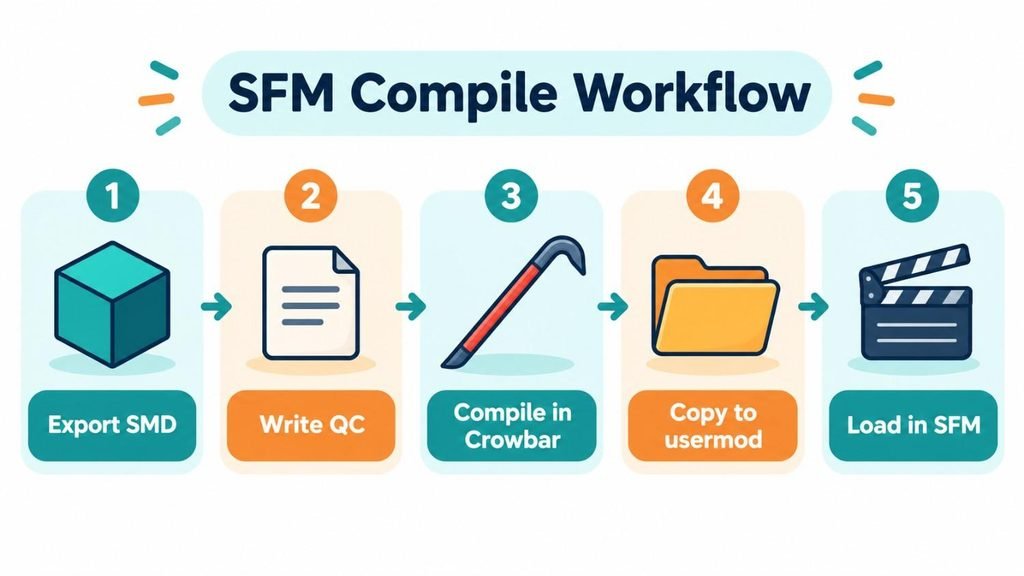
- Export your model from Blender or Maya as SMD or DMX files.
- Put the mesh and animation files together in one clean folder.
- Write or edit a QC file that points to those meshes.
- Open Crowbar and choose Source Filmmaker as the game.
- Select your QC file on the Compile tab.
- Set the output so files land in the SFM usermod folder.
- Click Compile and read the log for errors.
- Open SFM and add the model through the Animation Set Editor.
Let us look at what really happens in each step.
Understanding the QC File
The QC file looks scary at first. It is only a short list of commands. Here is a tiny example for a simple prop:
$modelname "custom/crate.mdl"
$body "crate" "crate_ref.smd"
$cdmaterials "models/custom/crate/"
$sequence "idle" "crate_ref" fps 30
$surfaceprop "wood"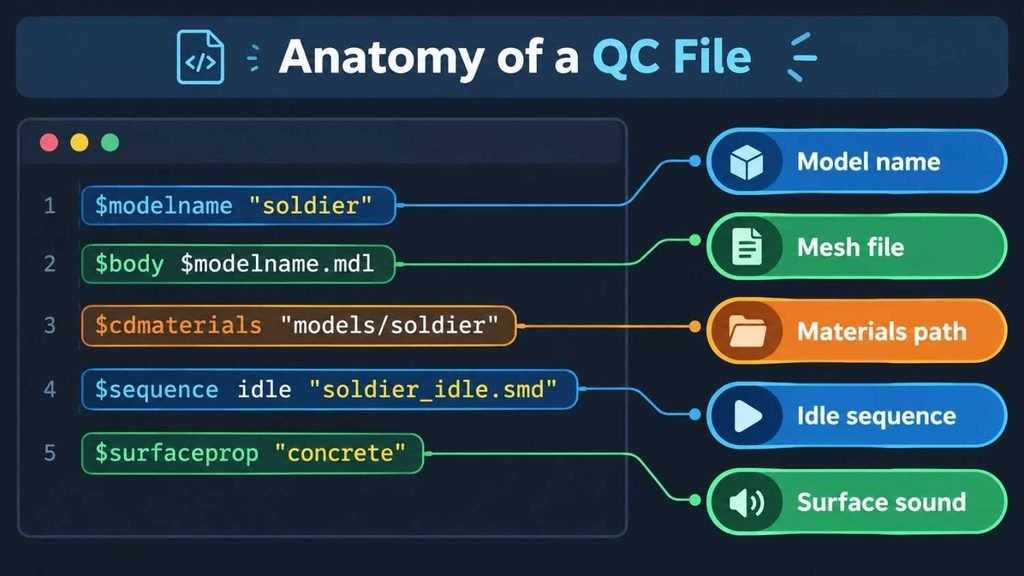
Each line has a plain job. The first line names the final model and where it will live. The second line tells the compiler which mesh to use. The third line points to the folder that holds your materials. The fourth line adds a basic pose called idle. The last line sets the sound and feel of the surface.
Two lines cause most beginner mistakes. The first is the materials path. If it does not match the real folder, your model shows up with a missing texture. The second is the sequence line. Source models need at least one sequence. Without it, the compile fails or the model refuses to load.
You can add many more commands as you grow. Body groups let you swap outfits. LOD commands make lower-detail versions for far-away views. Collision commands build the physics shape. Start small and add one feature at a time. Test after every change so you know which edit caused a problem.
Textures and Materials for SFM Compile
A model without textures is a gray blob. The source uses two file types for surfaces. VTF files hold the image data. VMT files are small text files that describe how the surface should look.
The process goes like this. You paint a texture in any image editor, save it as a PNG or TGA file. You open VTFEdit and convert it to a VTF file then write a VMT file that points to that texture with the basetexture command and can add extra settings for shine, bumps, and transparency.
Folder paths matter here. The VMT file must sit in the exact folder named by your QC file. If your QC says models/custom/crate, then the VMT belongs in materials/models/custom/crate. The name of each VMT must match the material name inside your mesh. One small typo and you will see the famous purple and black checkerboard. That pattern is Source’s way of saying a texture is missing.
Keep texture sizes to powers of two. Common choices are 256, 512, and 1024 pixels on each side. Odd sizes can cause errors or bad quality. Smaller textures also keep your scenes fast.
Compiling Maps and Animations
Models get the spotlight, but maps and animations follow similar rules. The table below shows how the main compile jobs compare.
| Job | Input | Output | Main Tool |
|---|---|---|---|
| Model compile | SMD or DMX meshes plus QC file | MDL, VVD, and VTX files | Crowbar |
| Animation compile | SMD or DMX motion files plus QC file | Sequences inside the MDL | Crowbar |
| Texture compile | PNG or TGA images | VTF and VMT files | VTFEdit |
| Map compile | VMF map file | BSP map file | Hammer |
| Movie export | SFM session | Video or image sequence | SFM export menu |
For animations, you add more sequence lines to your QC file. Each line points to a motion file and gives it a name. You can then pick that name inside SFM. Some creators build a separate model with only animations. They pull it into the main model with an include command. This keeps files small and organized.
Maps follow a longer path. You build a scene in Hammer and save it as a VMF file. The map compilers then run in stages. One builds the geometry. One checks what is visible. One bakes the lighting. The finished BSP file goes into the maps folder inside usermod. SFM can then load it as a set for your shot.
Movie export is the last kind of compile. Some SFM users use the word for rendering. When your shot is ready you export it as a video or as an image sequence. Many pros pick image sequences because they survive crashes and give cleaner results in editing software. You can then join the frames in a video editor and add sound.
Common SFM Compile Errors and How to Fix Them
Every creator hits errors. Here are the usual suspects with quick fixes:
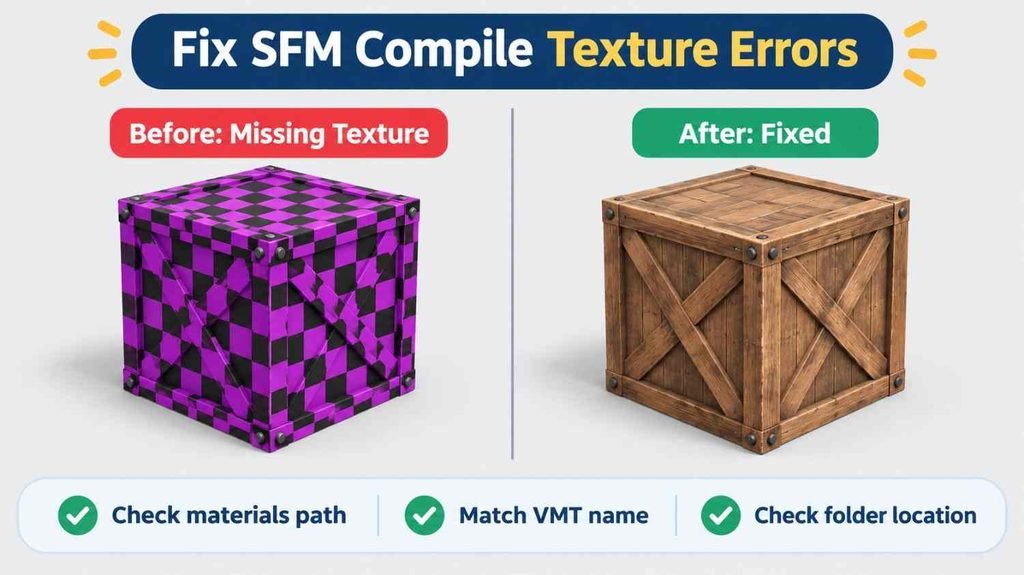
- Purple and black checkerboard: check the materials path and the VMT folder location
- Too many materials: merge materials or split the model into two parts
- Cannot open file: make sure mesh names in the QC match your files exactly
- Model missing in SFM: copy every compiled file into the usermod models folder
- Stretched or twisted model: recheck scale and bone weights before exporting
- No sequences found: add an idle sequence line to your QC file
- Strange compiler errors: confirm Source Filmmaker is chosen as the game in Crowbar
The log in Crowbar tells you almost everything. Read it from the top. The first error is usually the real cause. Later errors are often side effects. Fix the first one and compile again before you chase the rest.
When you are stuck copy the exact error text into a search box. Chances are someone on a Steam forum or a modding site hit it before you. Add the words Crowbar or Source Filmmaker to narrow the results.
Tips for Cleaner Compiles
Good habits save time. These simple rules help most creators:
- Keep every project in its own folder with short file names
- Compile often so you can spot the change that broke things
- Name materials the same way in your mesh and your VMT files
- Reduce polygons before export to keep SFM running smoothly
- Back up working QC files before you try big edits
- Test the model in SFM before you build a full scene
Also think about performance. SFM can slow down fast with heavy models. A character with a million triangles will make your timeline crawl. Use only the detail the camera can see. Level of detail models help a lot. They swap in simpler versions when the model is far from the camera.
Finally keep your tools updated. Crowbar and Blender Source Tools get fixes from time to time. A new release can solve a bug that cost you a whole weekend.
Conclusion
SFM compile is the bridge between your 3D tools and Source Filmmaker. It is not slang and it is not magic. It is a repeatable process. You export clean meshes and describe them in a QC file. You run the compiler and place the results in the right folder. Then you load the model and start animating.
The takeaway is simple. Learn the pipeline once and you can use it for every future project. Start with a basic prop. Get it into SFM with a working texture. Then add bones, animations and extra features step by step. Most problems come from wrong paths or mismatched names. Check those two things first and you will solve most errors in minutes.
FAQs
What does SFM compile mean?
It means converting 3D models, textures or maps into Source Engine formats so Source Filmmaker can load them. For models the main output is an MDL file.
What is Crowbar used for in SFM?
Crowbar is a free tool that compiles QC files into models and decompiles existing models. It runs StudioMDL for you through a simple window.
Can I compile FBX or OBJ files for SFM directly?
No. StudioMDL reads SMD and DMX files. Export your FBX or OBJ model to one of those formats first using Blender Source Tools.
Why does my SFM model show a purple and black checkerboard?
The texture is missing. Check that your QC materials path matches the real folder and that the VMT and VTF files sit in the right place.
Does SFM compile work with Source 2 assets?
No. Source Filmmaker uses the older Source Engine. Source 2 models and maps use a different pipeline and will not compile for SFM.