


Here’s a frustrating scenario. You publish a great page, wait a week, and Google still hasn’t noticed it. Nothing is wrong with the content. The crawler simply never found it. A clean XML sitemap fixes that problem cheaply, and a sitemap generator UploadArticle workflow is one quick way to build one.
Think of a sitemap as a guest list for crawlers. Instead of hoping bots stumble onto every page through links, you tell them exactly which URLs matter. That helps most on new sites, big sites, and sites with few backlinks.
In this guide you’ll learn what a sitemap generator does, how UploadArticle’s tool is described, how crawlers search and analyze your file, and how to generate, upload, and submit a sitemap. You’ll also see which mistakes quietly break sitemaps and how this tool stacks up against other options.
What Is a Sitemap Generator and Where Does UploadArticle Fit?
A sitemap generator crawls your site, gathers the URLs it finds, and writes them into a properly formatted sitemap.xml file. You skip the hand coding, and you skip the typos that come with it.
How the sitemap generator UploadArticle tool is described
Reviews describe it as an online tool that scans a public website and builds an XML sitemap from the internal URLs it discovers. Some write ups also say you can pick which pages to include, set priorities, and suggest how often Google should return to certain content. startupeditordesignbeep
One caution is worth repeating. At least one review tells readers to confirm the generator page is genuine and to test its output before relying on it. That’s good advice for any free tool, and the testing section below shows you how. startupeditor
Who gets the most value
New websites have few inbound links, so crawlers have fewer paths in. Large catalogs and publishers have so many pages that some get missed. Sites that update often need a quick way to flag fresh content. And any site with orphan pages, meaning pages no internal link points to, benefits because the sitemap becomes the only door in.
Generator versus manual sitemap
| Factor | Manual sitemap | Generator tool |
|---|---|---|
| Setup time | Hours | Minutes |
| Chance of errors | High | Low |
| Handles hundreds of URLs | Painful | Easy |
| Technical skill needed | Yes | No |
| Updates itself | No | Depends on the tool |
How Search Engines Search and Analyze Your Sitemap
Once you know what happens after upload, you can build a better file from the start.
Discovery: how bots find the file
Crawlers find your sitemap in three main ways. You can submit it in Google Search Console or Bing Webmaster Tools. You can add a Sitemap line to your robots.txt file. Or they can check the default location at the root of your domain. Doing all three leaves nothing to chance.
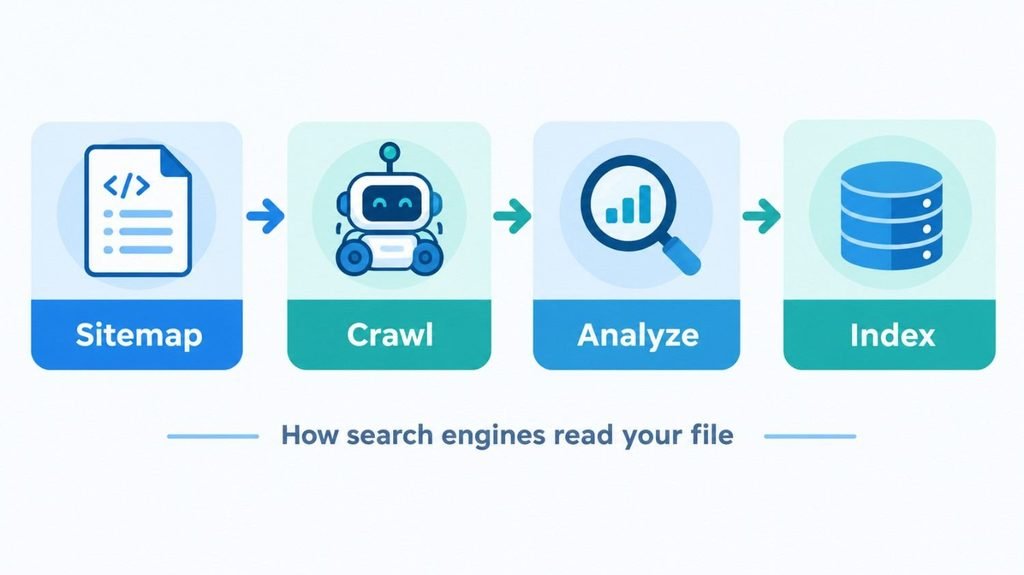
Crawling: how bots search and analyze listed URLs
After reading the file, a crawler queues your URLs for fetching. It then loads each page, reads the content, and decides whether the page deserves a spot in the index. Your sitemap is a suggestion, not a command. A listed page that loads slowly, duplicates another page, or says very little can still be skipped.
What Google actually reads
Google’s sitemap documentation explains which fields matter. The location tag is required. The last modified date is used when it proves accurate over time. The priority and change frequency tags are ignored.
So don’t burn an afternoon tweaking priority values. Spend that time keeping your last modified dates honest. Only change a date when the page content truly changes. If every date updates on every rebuild, Google learns to distrust the field.
Limits to remember
One sitemap file can hold up to 50,000 URLs and must stay under 50 MB. Beyond that, split your URLs across several files and list them in a sitemap index. The official sitemaps.org protocol covers the format in detail. lovable
How to Use a Sitemap Generator UploadArticle Style Workflow
The process looks about the same whichever tool you pick.
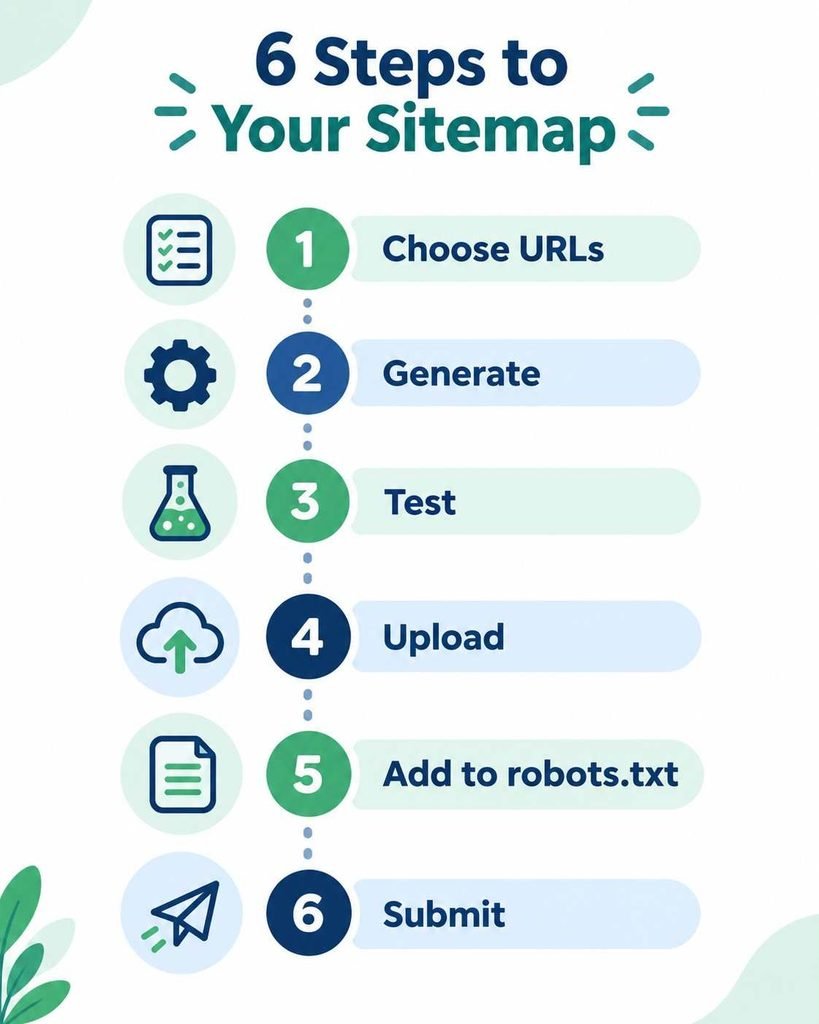
Step 1: Decide what belongs in the file
Include canonical pages that return a 200 status and that you actually want in search results. Leave out redirected URLs, pages marked noindex, duplicate or filtered versions of the same page, login and cart pages, internal search results, and anything that returns an error.
Step 2: Generate the file
Enter your domain, choose your settings, and run the crawl. When it finishes, scan the URLs for consistency. Pick one version of your domain and stick to it, whether that’s https or http, www or no www, with or without a trailing slash. Mixed formats create duplicate signals.
Step 3: Test the generator on a small site first
Because reports about this tool vary, a short test protects your live site. Build a tiny practice site with a few normal pages, one redirected page, and one noindex page. Generate a sitemap, then check that the normal pages appear and the other two don’t. Validate the XML too. If the tool stumbles on any of this, try another one.
Step 4: Upload to your root directory
Place the file where it loads at yourdomain.com/sitemap.xml. On traditional hosting, use your control panel’s file manager or an FTP client and drop it into the public folder. On hosted platforms, follow their upload or redirect settings.
Step 5: Point to it from robots.txt
Add a single line that gives the full sitemap URL, starting with the word Sitemap. Google’s guide to creating a robots.txt file shows the exact format.
Step 6: Submit to the search engines
Open Search Console, go to the Sitemaps report, and enter your file’s address. Do the same in Bing Webmaster Tools. Google retired its old sitemap ping option, so Search Console is the dependable route.
Sitemap Generator Upload Article vs Other Options
No tool wins every situation. This table helps you match the tool to the job.
| Tool type | Best for | Strength | Limitation |
|---|---|---|---|
| UploadArticle style web generator | Small sites and quick jobs | Simple setup in a browser | Features documented unevenly, so verify first |
| Desktop crawler such as SEO PowerSuite | Technical audits | Deep control and error checks | Learning curve, some paid features |
| CMS plugin such as Yoast or Rank Math | WordPress sites | Updates when you publish | Tied to one platform |
| Hosted platform sitemap such as Shopify or Wix | Online stores and site builders | No setup at all | Little room to customize |
| Custom script | Very large sites | Built to your exact needs | Needs developer time |
When a web generator makes sense
Pick one when you have a small or static site, no plugin available, and a need for a file today. If your site passes a few thousand URLs or changes daily, automate the process instead.
When something else fits better
On WordPress, a plugin keeps your sitemap in sync every time you publish or delete a post. A one time file goes stale the moment you add a page.
A note on Bing and IndexNow
Bing and a few other engines support IndexNow, a protocol that pushes URL changes to them instantly. It works alongside a sitemap rather than replacing it, and it’s worth a look if fast discovery matters to you.
Sitemap Best Practices That Help Crawlers Search and Analyze Your Content
Keep the file current
Regenerate after a redesign, a migration, or a large content update. A sitemap full of deleted pages wastes crawler attention and shows up as errors in Search Console.
Protect your crawl budget
Crawl budget matters most on large sites, as Google’s page on managing crawl budget explains. The idea still applies everywhere. Every junk URL in your sitemap is a wasted visit, so a lean file points crawlers at the pages that earn you traffic.
Split big sites into themed files
Separate sitemaps for blog posts, products, and categories make your reports far easier to read. You might discover that nearly all blog URLs are indexed while only some product URLs are. That tells you exactly where to dig.
Add image and video details when they matter
If visuals drive traffic for you, image and video extensions give crawlers extra context about media they could otherwise miss. Google covers the options in its guide to building a sitemap.
XML sitemap versus HTML sitemap
| Feature | XML sitemap | HTML sitemap |
|---|---|---|
| Audience | Search engines | Human visitors |
| Format | Machine readable XML | A normal web page |
| Main benefit | Discovery and indexing | Navigation and internal links |
| Required | Strongly recommended | Optional |
Common Sitemap Mistakes and How to Fix Them
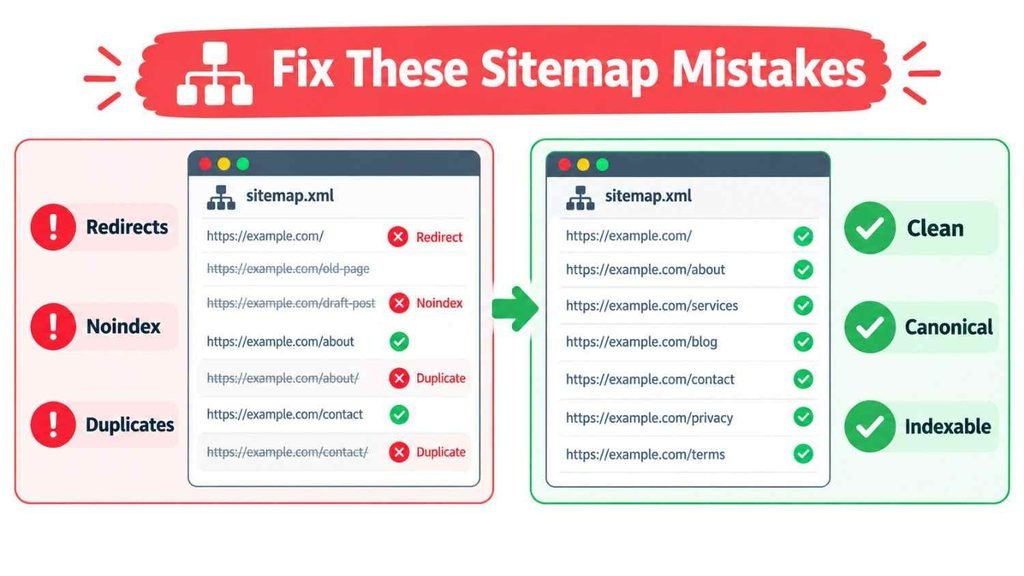
Listing pages that shouldn’t be indexed
This is the most common problem. If Search Console reports a submitted URL marked noindex, or a submitted URL with a redirect, your generator is including pages it shouldn’t. Add exclusion rules or clean the file by hand.
Forgetting to submit
A sitemap sitting on your computer does nothing. Upload it, reference it in robots.txt, and submit it.
Mixing URL versions
Say your real pages live at https://www.example.com but the sitemap lists http://example.com. You’ve created conflicting signals. Make every URL match its canonical form.
Faking last modified dates
Setting every date to today is a tempting shortcut. Over time, Google stops trusting the field for your site.
Expecting a guaranteed result
A sitemap helps discovery. It doesn’t force indexing. If pages stay stuck as discovered but not indexed, improve the content and the internal links rather than regenerating the file again.
How to Check Results After You Submit
Read the Sitemaps report
Search Console shows whether your file was read successfully, how many URLs it found, and when Google last fetched it. Errors appear here first.
Compare submitted and indexed pages
Open the Pages report and compare the numbers. A large gap usually points to quality, duplication, or crawl problems, not a sitemap problem.
Watch your indexing speed
Note how long new pages take to show up after you publish. If it drags, add internal links to new posts from your strongest pages. Links carry more weight than a sitemap.
Conclusion
A good sitemap won’t rescue thin content, but it clears one big obstacle by helping search engines find every page worth finding. Whether you use the sitemap generator UploadArticle offers or a different tool, the formula stays the same. List only clean, canonical URLs, keep your dates honest, upload the file to your root, mention it in robots.txt, and submit it to Google and Bing.
Three takeaways to remember. First, a sitemap helps crawlers search and analyze your site faster, but it’s a hint and never a guarantee. Second, quality beats quantity, so include only indexable pages with a 200 status. Third, test any generator, including this one, on a small practice site before trusting it with your real one.
Ready to start? Generate your file today, validate it, and submit it in Search Console. Check back in a week and see how many pages got picked up.
Frequently Asked Questions
What is a sitemap generator UploadArticle tool used for?
It creates an XML sitemap listing your site’s key URLs. Test its output on a small practice site before using it on your live pages.
Do small websites need a sitemap?
It’s not required, but it helps. A sitemap speeds up discovery of new pages and gives you cleaner indexing data in Search Console.
How many URLs can one sitemap hold?
Up to 50,000 URLs and 50 MB uncompressed. Larger sites should split pages across files and link them with a sitemap index.
Does Google use priority and change frequency tags?
No, Google ignores both. Keep your last modified dates accurate instead, since Google can use that field when it proves reliable.
How often should I update my sitemap?
Update it whenever you add, remove, or meaningfully change pages. Busy sites should automate it with a plugin or script.